> For the complete documentation index, see [llms.txt](https://gitbook.cdxiaodong.life/llms.txt). Markdown versions of documentation pages are available by appending `.md` to page URLs; this page is available as [Markdown](https://gitbook.cdxiaodong.life/linux-an-quan/bash-tips.md).
# Bash技巧
## Bash 技巧
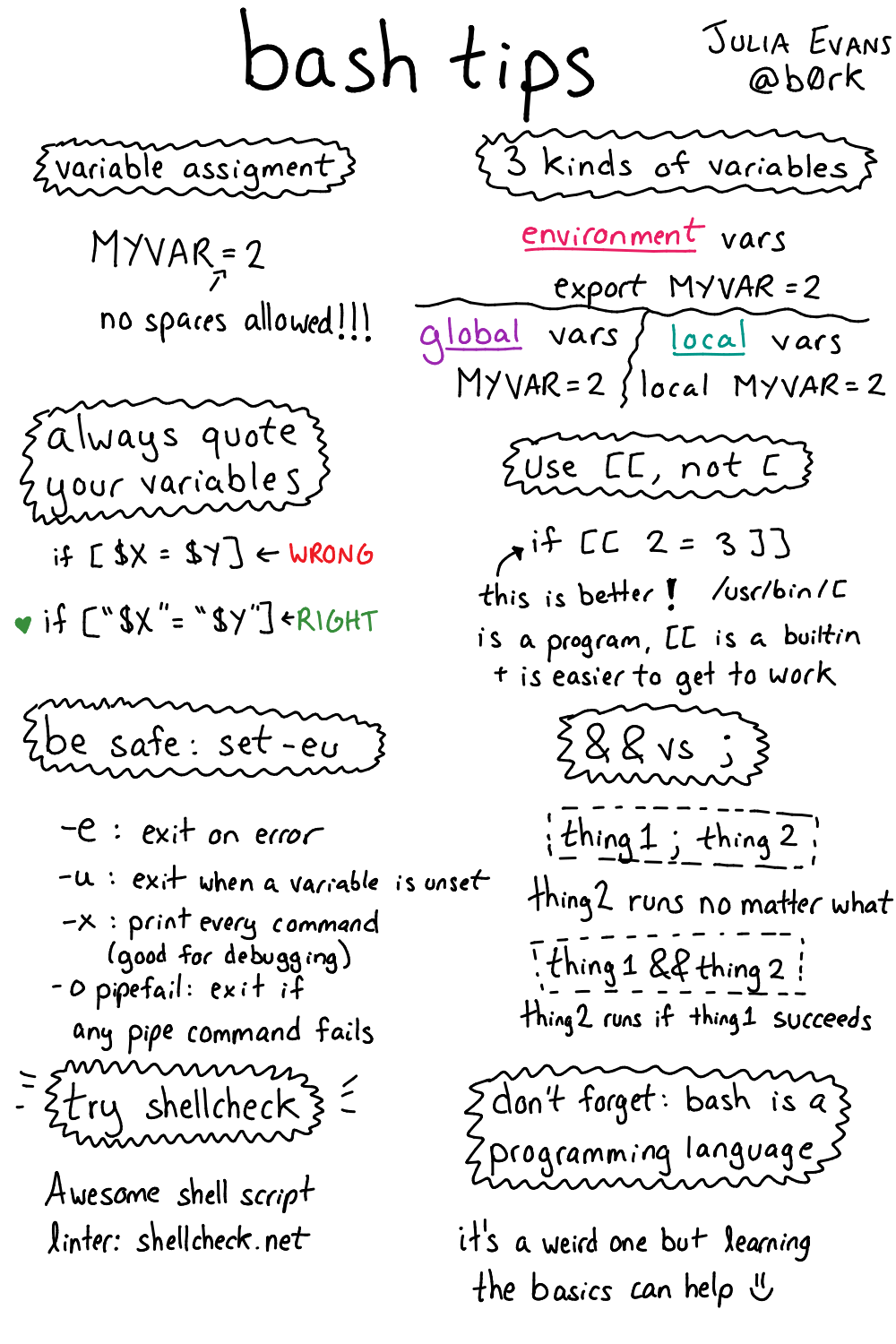
### Bash 多进程处理
{% embed url="" %}
## 有用命令
### cheat.sh - 命令速查工具
[cheat.sh](https://github.com/chubin/cheat.sh) 提供对世界上最好的社区驱动的速查表存储库的统一访问。
```bash
# 要获取速查表,只需使用以下命令
# 将 更改为命令名称,例如 ls、id、curl 等
$ curl cheat.sh/
# curl 的速查表
$ curl cheat.sh/curl
```
### aria2c - 多线程下载工具
[aria2](https://github.com/aria2/aria2) 是一个轻量级的多协议和多源、跨平台的命令行下载工具。
```bash
# 多线程下载
$ aria2c -x5
# 重启 aria2c 会继续未完成的下载
$ aria2c -x5
^C
$ aria2c -x5 # 下载继续
# 下载种子文件(只需将种子文件传递给输入)
$ aria2c .torrent
```
### chmod - 文件权限修改
```bash
# 为所有者启用所有权限,为组启用写入权限,为其他人启用执行权限
# 或者 rwx-w---x
$ chmod 721
### 详细形式
# 为用户启用 rwx
$ chmod u+rwx
# 为组启用 w
$ chmod g+w
# 为其他人启用 x
$ chmod o+x
# 为所有人启用 x
$ chmod a+x
### 移除权限(使用 '-' 代替 '+')
# 禁用组和其他人的 x 权限
$ chmod og-x
### setuid (4), setgid (2), sticky (1) 位
# 设置 setgid 位
# 或者 rwxr-sr-x
$ chmod 2755
## 详细形式
# 设置 setuid 位
$ chmod u+s
# 设置 setgid 位
$ chmod g+s
# 设置 sticky 位
$ chmod o+t
```
#### 权限数字对照表
| 权限 | 数字 | 含义 |
| --- | -- | -------- |
| rwx | 7 | 读取+写入+执行 |
| rw- | 6 | 读取+写入 |
| r-x | 5 | 读取+执行 |
| r-- | 4 | 读取 |
| -wx | 3 | 写入+执行 |
| -w- | 2 | 写入 |
| --x | 1 | 执行 |
| --- | 0 | 无权限 |
#### 特殊权限
* **setuid (4)**: 以文件所有者权限执行
* **setgid (2)**: 以文件所属组权限执行
* **sticky (1)**: 只有文件所有者能删除文件
### curl - 数据传输工具
[curl](https://github.com/curl/curl) 是一个命令行工具和库,用于使用URL语法传输数据。
有用的操作模式:
* [-o, --output ](https://curl.se/docs/manpage.html#-o)- 将输出写入`file`而不是stdout。
* [-X, --request ](https://curl.se/docs/manpage.html#-X)- 指定在与HTTP服务器通信时使用的自定义请求方法。
* [-H, --header ](https://curl.se/docs/manpage.html#-H) - 在向服务器发送HTTP时要包含的额外标头。
* [-d, --data ](https://curl.se/docs/manpage.html#-d)- 向请求添加主体。
* [--path-as-is](https://curl.se/docs/manpage.html#--path-as-is) - 告诉curl不要处理给定URL路径中的`/../`或`/./`序列。
* [-v, --verbose](https://curl.se/docs/manpage.html#-v) - 使curl在操作期间详细输出。
#### 常用 curl 示例
```bash
# GET 请求
$ curl https://api.example.com/data
# POST 请求
$ curl -X POST -H "Content-Type: application/json" -d '{"key":"value"}' https://api.example.com
# 下载文件
$ curl -o filename.jpg https://example.com/image.jpg
# 跟随重定向
$ curl -L https://example.com
# 设置超时
$ curl --connect-timeout 10 --max-time 30 https://example.com
# 使用代理
$ curl -x http://proxy.example.com:8080 https://example.com
# 显示响应头
$ curl -I https://example.com
# 保存cookie
$ curl -c cookies.txt https://example.com
# 使用cookie
$ curl -b cookies.txt https://example.com
```
### find - 文件查找工具
```bash
# 大小写敏感搜索
$ find / -name '*some*'
# 大小写不敏感搜索
$ find / -iname '*some*'
# ls 样式的输出格式
$ find / -iname '*some*' -ls
# 删除找到的文件(危险:没有确认)
$ find dir_to_delete/ -delete
# 使用搜索结果执行脚本
# 格式:
# -exec {} \;
# - 要执行的脚本/命令
# {} - 找到的文件的位置
# \; - 的结束
$ find / -iname '*some*' -exec ./script.sh {} \;
```
#### 高级 find 用法
```bash
# 按类型查找
$ find . -type f # 普通文件
$ find . -type d # 目录
$ find . -type l # 符号链接
# 按大小查找
$ find . -size +10M # 大于10MB
$ find . -size -1k # 小于1KB
# 按时间查找
$ find . -mtime -7 # 7天内修改过
$ find . -atime +30 # 30天前访问过
# 按权限查找
$ find . -perm 755 # 权限为755的文件
$ find . -perm -u=x # 用户有执行权限
# 组合条件
$ find . -name "*.log" -mtime +30 -size +1M
```
### grep - 文本搜索工具
```bash
# 不使用正则表达式搜索字符串
# fgrep 是 grep -F 的别名
$ fgrep
# 使用perl兼容的正则表达式(或"真正的"正则表达式)
$ grep -P
# 在gz压缩文件中搜索
$ zgrep
# 在搜索结果中高亮找到的单词
$ grep --color=force
# 反向匹配(不包含匹配的行)
$ grep -v
# 按文件内容搜索
$ grep -rnw '/path/to/somewhere/' -e 'pattern'
```
#### 常用 grep 选项
```bash
# 递归搜索目录
$ grep -r "pattern" /path/to/dir
# 显示行号
$ grep -n "pattern" file.txt
# 只显示匹配的文件名
$ grep -l "pattern" *.txt
# 显示不匹配的文件名
$ grep -L "pattern" *.txt
# 统计匹配行数
$ grep -c "pattern" file.txt
# 显示匹配行的上下文
$ grep -A 2 -B 2 "pattern" file.txt # 前后各2行
# 匹配整个单词
$ grep -w "word" file.txt
# 忽略大小写
$ grep -i "pattern" file.txt
# 使用扩展正则表达式
$ grep -E "pattern1|pattern2" file.txt
```
### ipython - 交互式Python shell
[ipython](https://github.com/ipython/ipython) 是一个方便的Python命令行shell,支持:
* Tab补全
* 通过`.method?` + enter获取帮助
* 在脚本中嵌入进行调试,使用交互式shell:
```python
from IPython import embed; embed()
```
### ncdu - 磁盘使用分析器
[ncdu](https://dev.yorhel.nl/ncdu) 是一个带有ncurses界面的磁盘使用分析器。
```bash
$ ncdu /
```
有用的热键:
* 通过方向键导航
* `s` - 按大小排序
* `C` - 按数量排序
* `c` - 显示数量
* `d` - 删除
### pv - 管道进度监控器
[pv](https://linux.die.net/man/1/pv) - 监控通过管道的数据的进度。
```bash
$ ./app1 | pv | ./app2
$ cat /dev/urandom | pv | xxd > /dev/null
# 类似cat的行为,带有进度条
$ pv file | ./app
$ pv some_file.txt | bzip2 > /dev/null
# tar压缩进度条
$ tar cz /folder | pv > folder.tar.gz
# 网络数据传输进度条
$ pv folder.tar.gz | nc -nlvp 1337
# 监控其他进程
$ pv -d PID
# 限制速度
$ pv file.txt -L 2 # 每秒2字节
$ pv file.txt -L -l 2 # 每秒2行
```
### ssh - 安全远程连接
{% embed url="" %}
#### 常用SSH命令
```bash
# 基本连接
$ ssh user@hostname
# 指定端口连接
$ ssh -p 2222 user@hostname
# 使用密钥文件连接
$ ssh -i ~/.ssh/private_key user@hostname
# 端口转发
$ ssh -L 8080:localhost:80 user@hostname # 本地转发
$ ssh -R 8080:localhost:80 user@hostname # 远程转发
# SSH隧道
$ ssh -L 9999:target-host:80 user@jump-host
# 执行远程命令
$ ssh user@hostname "ls -la"
# 文件传输
$ scp file.txt user@hostname:/remote/path/
$ scp user@hostname:/remote/file.txt /local/path/
```
### tar - 归档工具
[tar](https://linux.die.net/man/1/tar) 将许多文件一起保存到单个磁带或磁盘归档中,并可以从归档中恢复单个文件。
有用的操作模式:
* `-c` - 创建新归档
* `-f` - 使用归档文件或设备ARCHIVE
* `-j, --bzip2` - 通过bzip2压缩/解压缩归档
* `-z, --gzip` - 通过gzip压缩/解压缩归档
* `-t, --list` - 列出归档的内容
* `-x` - 从归档中提取文件
* `-C, --directory=DIR` - 将输出目录更改为DIR
* `-v` - 详细列出处理的文件
```bash
# 创建tar归档
$ tar cf archive.tar foo bar
# 创建bzip2归档
$ tar cf archive.tar.bz2 foo bar
# 创建gzip归档
$ tar cf archive.tar.gz foo bar
# 提取归档
$ tar xf archive.tar.gz
# 提取到指定目录
$ tar xf archive.tar.gz -C /path/to/extract
# 查看归档内容
$ tar tf archive.tar.gz
# 排除文件
$ tar czf backup.tar.gz --exclude='*.log' /path/to/backup
```
### youtube-dl - 视频下载工具
[youtube-dl](https://github.com/ytdl-org/youtube-dl) 是一个命令行程序,用于从YouTube和其他视频网站下载视频。
```bash
$ youtube-dl https://youtu.be/somth12asd34
# 选择格式和质量
$ youtube-dl -f "best[height<=720]" URL
# 下载音频
$ youtube-dl -x --audio-format mp3 URL
# 下载播放列表
$ youtube-dl -f "best" -cit URL
# 下载字幕
$ youtube-dl --write-sub --sub-lang en URL
```
### 现代Unix工具
{% embed url="" %}
#### 其他有用的工具
**jq - JSON处理器**
```bash
$ cat file.json | jq '.key'
$ echo '{"name": "John", "age": 30}' | jq '.'
```
**rg - 代码搜索工具**
```bash
$ rg "pattern" /path/to/search
$ rg -i "pattern" # 忽略大小写
```
**fd - 文件查找工具**
```bash
$ fd "pattern"
$ fd -e md -e txt # 按扩展名查找
```
**htop - 进程监控器**
```bash
$ htop
$ htop -u username # 显示特定用户的进程
```
**bat - 增强版cat**
```bash
$ bat file.txt
$ bat -A file.txt # 显示所有字符
```
---
# Agent Instructions
This documentation is published with GitBook. GitBook is the documentation platform designed so that both humans and AI agents can read, navigate, and reason over technical content effectively. Learn more at gitbook.com.
## Querying This Documentation
If you need additional information that is not directly available in this page, you can query the documentation dynamically by asking a question.
Perform an HTTP GET request on the current page URL with the `ask` query parameter, and the optional `goal` query parameter:
```
GET https://gitbook.cdxiaodong.life/linux-an-quan/bash-tips.md?ask=&goal=
```
`ask` is the immediate question: it should be specific, self-contained, and written in natural language.
`goal` is optional and describes the broader end goal you are ultimately trying to accomplish on behalf of the user. GitBook uses it to tailor the answer towards what is most useful for that goal.
The response will contain a direct answer to the question and relevant excerpts and sources from the documentation.
Use this mechanism when the answer is not explicitly present in the current page, you need clarification or additional context, or you want to retrieve related documentation sections.